Mastering Depth and Detail: A Guide to 3D Laser Engrave Lily Designs
The evolution of laser engraving technology has transformed how creators approach surface decoration, moving far beyond simple vector lines and binary on-off etching. Today, the demand for photorealistic textures and three-dimensional depth has surged, particularly in the realm of botanical art. Among the most sought-after subjects is the lily, a flower renowned for its intricate petals and delicate gradients. Utilizing a 3D Laser Engrave Lily design allows artisans to capture the subtle nuances of light and shadow that define this elegant bloom. This process relies heavily on high-quality grayscale imagery, where varying shades of gray dictate the laser’s power output, resulting in a tangible sense of depth on materials like wood, leather, and acrylic.
For hobbyists and professionals alike, understanding the technical requirements of these files is crucial for achieving superior results. The foundation of any successful 3D engraving project lies in the source file. A standard black-and-white image will not suffice; instead, creators need optimized grayscale PNG files that have been specifically prepared for laser interpretation. These files serve as a map for the machine, instructing it to burn deeper or lighter based on pixel intensity. When working with a 3D Laser Engrave Lily, the quality of this digital asset determines the fidelity of the final physical product.
The Technical Foundation of Grayscale Laser Engraving
Grayscale laser engraving, often referred to as photo engraving or 3D engraving, operates on a principle distinct from traditional vector cutting. In vector processing, the laser follows a path, turning on and off to create lines. In contrast, grayscale processing treats the image as a raster map. The laser head moves back and forth across the material, modulating its power in real-time corresponding to the brightness of each pixel. Black pixels typically receive maximum power, creating deep, dark marks, while white pixels receive little to no power, leaving the material untouched. The intermediate shades of gray create the smooth transitions necessary for realistic imagery.
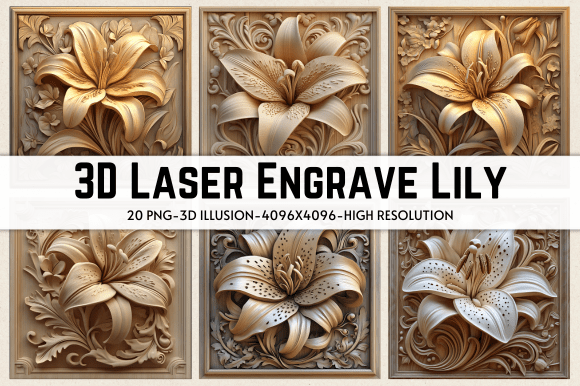
This technique is particularly effective for organic subjects like flowers. The lily, with its soft curves and gradual color shifts, benefits immensely from this method. However, not all images are created equal. A raw photograph often contains noise and compression artifacts that can ruin an engraving. Therefore, using a pre-processed file is essential. The 3D Laser Engrave Lily PNG files available for instant download are engineered to eliminate these issues. They come in high resolution, specifically 4096 x 4096 pixels, which ensures that even when scaled to large formats such as 13 x 13 inches, the detail remains crisp and free from pixelation.
Compatibility is another critical factor. These high-resolution PNGs are designed to work seamlessly with industry-standard software and hardware. Whether you are using a Glowforge, xTool, or LightBurn, the file structure remains consistent. The transparent background feature included in these packages allows for easy integration into larger designs without the need for manual background removal, saving significant time in the pre-production phase.
Optimizing Workflow for Glowforge Users
For owners of desktop laser cutters like the Glowforge, achieving the perfect 3D effect requires precise calibration. The machine’s interface allows for detailed control over speed, power, and line density, but finding the right balance can be challenging. When utilizing a 3D Laser Engrave Lily design, specific settings have been identified to yield optimal results on natural materials.
First, the material selection plays a pivotal role. Lighter woods, such as maple, birch, or basswood, are ideal because they provide a high-contrast canvas. Dark woods may absorb too much of the laser’s energy, making the subtle grayscale variations difficult to discern. Once the material is secured, the software settings must be adjusted. A recommended starting point involves setting the speed to 1000 and the power to 90. It is crucial to select the "Grayscale" or "Vary Power" option, which enables the laser to modulate its intensity rather than simply turning on and off.
Furthermore, the resolution of the scan, measured in Lines Per Inch (LPI), significantly impacts the smoothness of the image. An LPI of 270 is generally sufficient for most projects, but increasing this value can enhance detail at the cost of longer processing times. For a 3D Laser Engrave Lily, maintaining a single pass is usually adequate, provided the focus is accurate. Masking tape is often recommended to prevent smoke residue from staining the unengraved areas, although some users prefer the raw look. By adhering to these parameters, creators can consistently reproduce the delicate textures of lily petals with professional-grade precision.
Advanced Techniques with LightBurn Software
While proprietary software offers convenience, many advanced users prefer the flexibility of LightBurn. This powerful platform provides granular control over image processing, including dithering algorithms that convert grayscale images into patterns of dots. Dithering can sometimes produce sharper details than pure grayscale modulation, depending on the material and laser type.
When preparing a 3D Laser Engrave Lily in LightBurn, the choice of dither filter is critical. The Jarvis dither filter is widely regarded as one of the best options for photographic engraving. It distributes error diffusion in a way that minimizes visible patterns and creates a more natural, continuous tone appearance. To implement this, users import the high-resolution PNG file and apply the Jarvis filter within the image settings. This process ensures that the laser burns the design with optimal compatibility, accurately reproducing the subtle gradients of the lily.
LightBurn also allows for precise adjustment of the DPI (dots per inch), which correlates to the LPI setting in other software. Matching the DPI to the capabilities of the laser lens is essential for avoiding banding or blurring. Additionally, LightBurn’s preview function enables users to simulate the engraving process, allowing for adjustments before committing to the material. This feature is invaluable when working with expensive or rare woods, as it reduces the risk of wasted resources.
Versatile Applications Across Industries
The utility of high-quality 3D laser engraving files extends far beyond simple decorative plaques. The 3D Laser Engrave Lily design, with its universal appeal and elegant aesthetic, finds relevance in diverse sectors. In home decor, these engravings are used to create stunning wall art, coasters, and wooden signs that add a touch of nature to interior spaces. The depth achieved through grayscale engraving gives these items a premium feel that flat prints cannot match.
In the realm of stationery and paper crafts, laser-engraved lilies can be incorporated into invitation suites, greeting cards, and journal covers. The tactile quality of the engraving adds a sensory dimension to the user experience, making these items memorable keepsakes. Similarly, in textile and fashion design, laser engraving on leather or denim can produce unique, durable patterns. A lily motif engraved on a leather wallet or jacket sleeve offers a sophisticated, personalized touch that appeals to consumers seeking bespoke products.
Educators and researchers also benefit from these tools. Detailed botanical engravings can serve as teaching aids, illustrating the structural components of flowers with accuracy. For business owners, offering customized 3D engraved products can differentiate their brand in a crowded market. The ability to quickly produce high-quality, unique items using instant-download digital files streamlines production and reduces inventory costs.
Ensuring Quality and Compatibility
Before purchasing or downloading any digital asset for laser engraving, verifying compatibility is essential. The 3D Laser Engrave Lily package typically includes multiple file formats to ensure broad usability. The inclusion of both coloring PNGs and grayscale PNGs provides flexibility for different creative needs. Coloring PNGs may be used for reference or multi-layer projects, while grayscale PNGs are ready for immediate 3D engraving.
The file size, often around 531 MB for a comprehensive zipped folder, reflects the high resolution and lack of compression artifacts. This ensures that every petal vein and shadow gradient is preserved. Users should ensure their computer has sufficient storage and processing power to handle these large files efficiently. Additionally, checking the laser machine’s maximum bed size and power output is necessary to determine if the 13 x 13-inch design can be accommodated without scaling down, which might reduce detail.
Ultimately, the success of a 3D laser engraving project hinges on the synergy between high-quality digital assets and precise machine calibration. By leveraging optimized files like the 3D Laser Engrave Lily, creators can unlock new levels of artistic expression. Whether for personal enjoyment, educational purposes, or commercial ventures, mastering this technique opens up a world of possibilities in digital fabrication. The combination of advanced software settings, appropriate material selection, and superior source images ensures that each engraving is not just a mark on a surface, but a lasting work of art.